


Top 8 workflow management software

The selection of a workflow management system is a decision that shapes an organization’s operational DNA for years. In 2026, the market has matured to offer specialized solutions for diverse enterprise needs.

Table of contents
Workflow automation software mistakes to avoid
How to chose the best workflow software
Top 8 workflow automation software
1. Easy Redmine
2. Monday.com
3. Jira
4. Asana
5. Wrike
6. Smartsheet
7. Clickup
8. Trello
How to avoid failure when adopting workflow software
Automation comparison table
Integrations and extensibility of software
Security and governance matrix
Optimizing your workflow automation software ROI
TL;DR
The top workflow management software in 2026, led by Easy Redmine for secure hybrid projects and Jira for technical orchestration, prioritizes deep automation, flexible deployment (on-premises vs. cloud), and seamless integration to reduce manual friction without disrupting existing user habits.
Workflow automation software mistakes to avoid
When teams evaluate workflow automation software, several practical issues frequently complicate the adoption:
- Forced tool switching: If the software requires end users (especially developers) to leave their current tools or introduces extra admin work, it’s often rejected early in the process.
- Lack of integration clarity: Unclear sync rules, data mapping, or integration ownership creates risk. Teams worry about data loss, delays, or extra work, especially when connecting with systems like Jira, billing tools, or helpdesks.
- Cloud-only testing limits: Some vendors offer only cloud-based trials, but teams working in secure or on-prem environments can’t validate key automations without a full on-prem test option.
- Disruption of existing workflows: Automation is meant to reduce friction, not introduce it. If the tool alters current workflows too much, adoption drops and teams go back to manual processes.
These issues highlight why workflow automation software is often rejected, not for lack of features, but because it doesn't respect how people already work.
How to chose the best workflow software
When you choose workflow management software, three criteria tend to make the biggest difference:
- Fit to your workflow type (and depth of orchestration): support for the way your work actually runs, for tasks and approvals, integrations automation, or SLAs, and exceptions.
- Integrations and extensibility: strong coverage for your core systems plus APIs, webhooks, custom connectors, scripting, and event triggers to handle edge cases without constant workarounds.
- Governance, security, and operability: role-based access control, audit logs, and compliance-ready controls (dev/test/prod separation, secret management) so you can run workflows safely at scale.
Top 8 workflow automation software
This guide explores the best workflow software to help you bridge the gap between complex planning and automated execution.
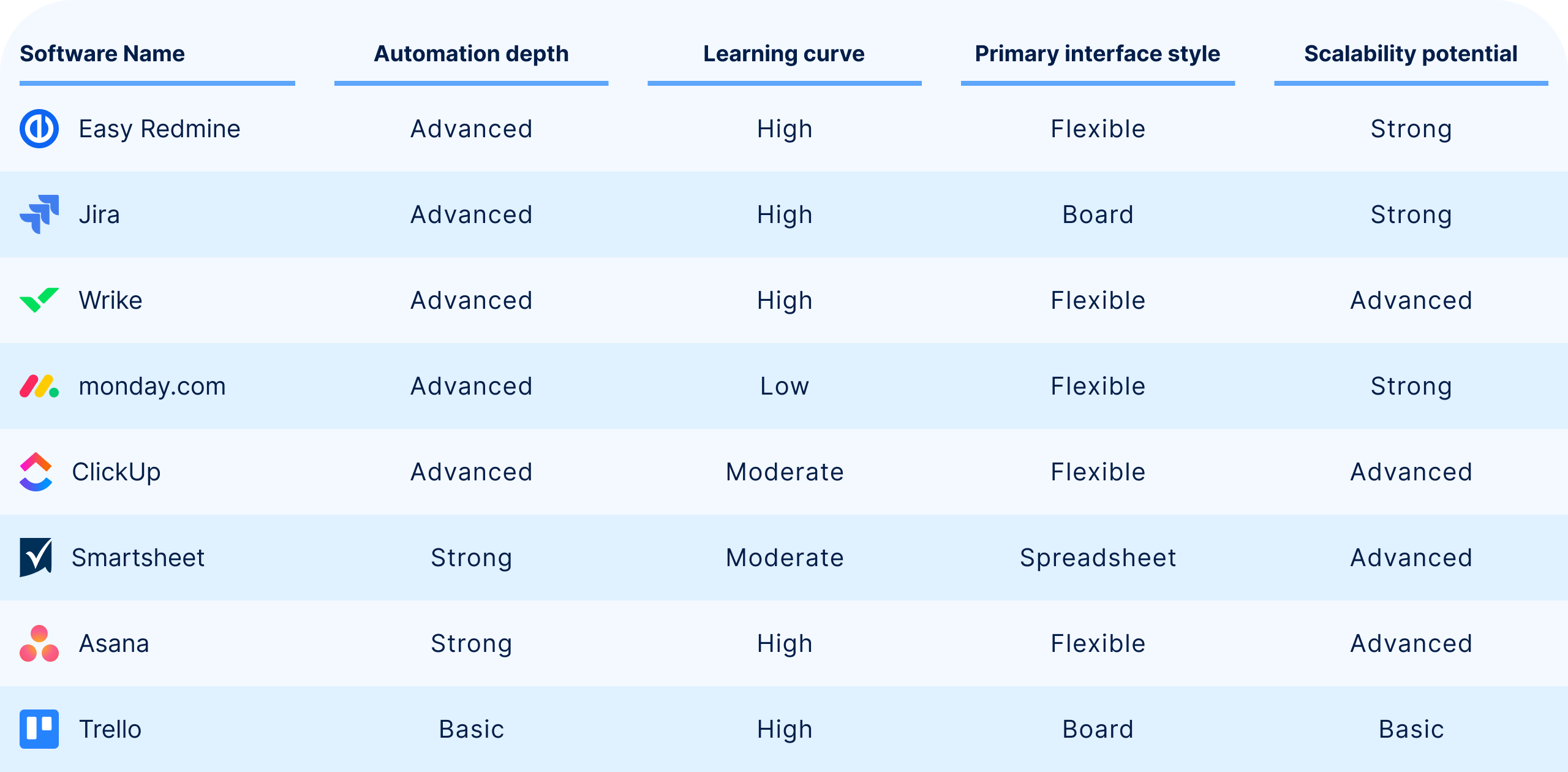
General comparison and scalability
1. Easy Redmine
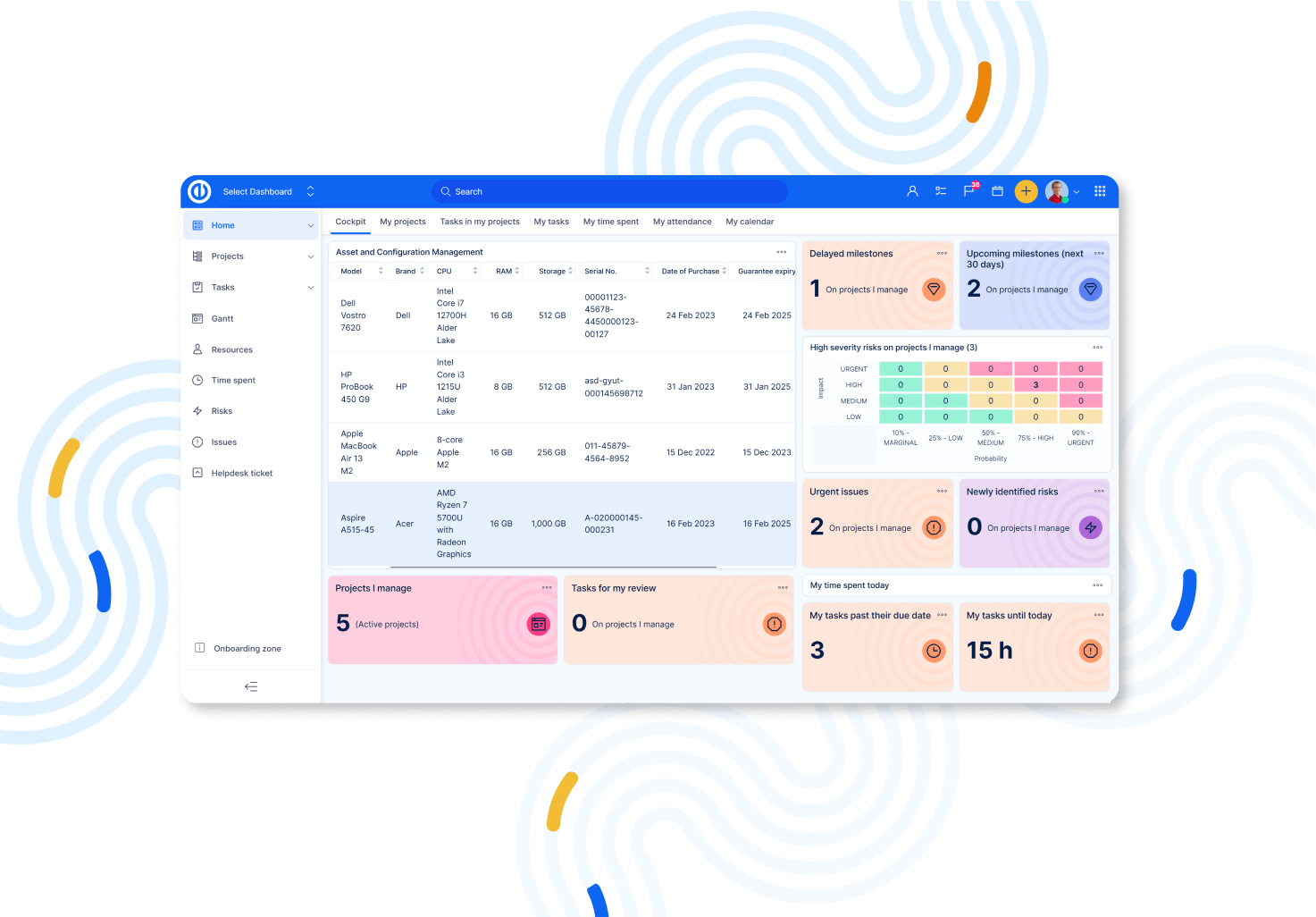
Easy Redmine is No.1 Private WorkOps Platform platform, combining waterfall planning (Gantt/WBS) and agile delivery (Kanban/Scrum) in one suite. It stands out for offering both cloud and on‑premises deployment, with published minimum licence rules that support security validation.
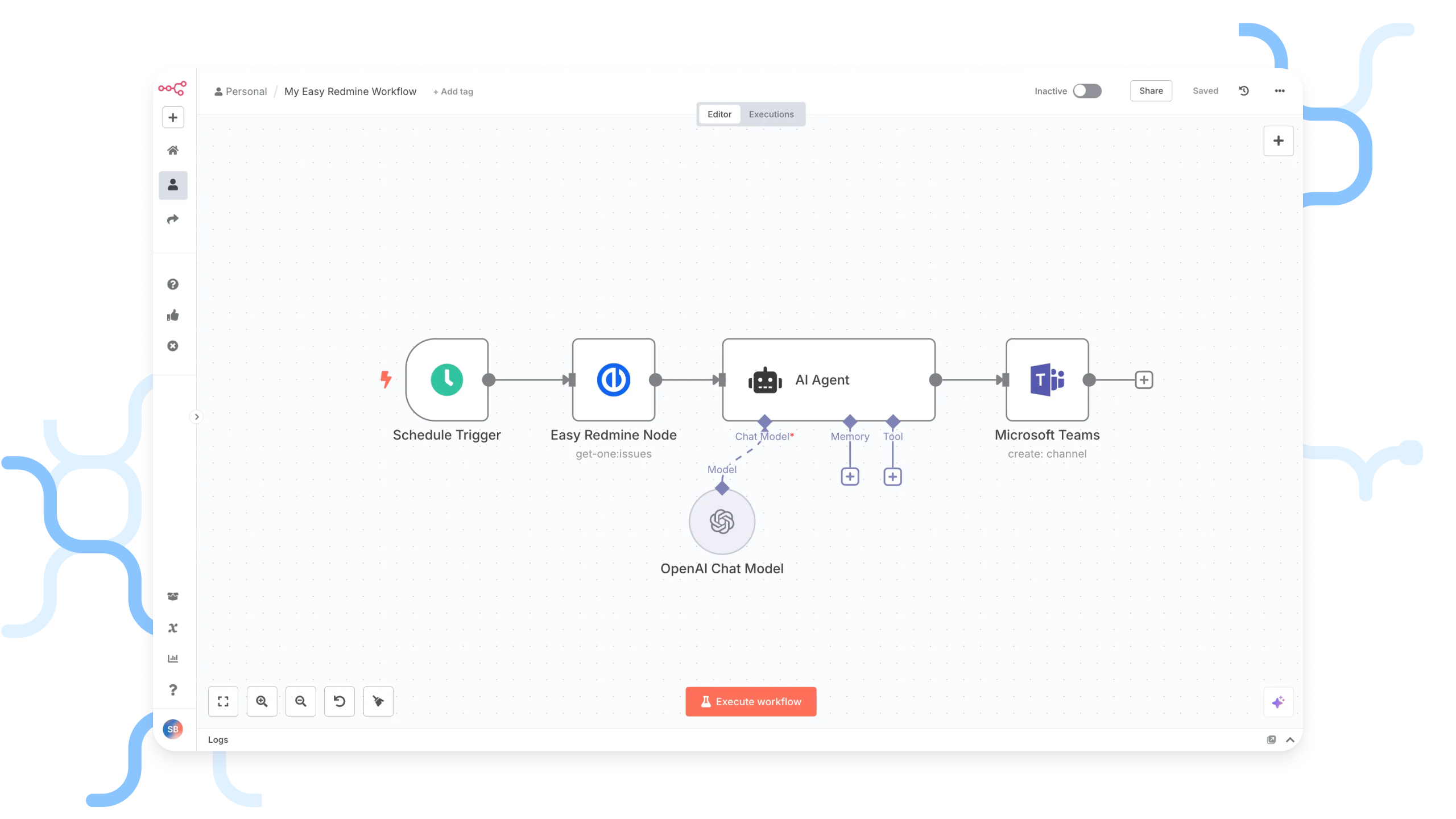
Easy Redmine is fully compatible with n8n and is positioned as a platform that can be connected to n8n to enable advanced workflow automation. Easy Redmine has established a strategic partnership with n8n, becoming a certified n8n Expert Partner.
This partnership enables Easy Redmine users to design and deploy automation workflows that extend beyond the core application, connecting various tools, synchronizing data, and automating manual processes across organizations.
Key features:
- Waterfall PM toolkit: Gantt and WBS.
- Agile PM tooling: Kanban and Scrum.
- Resource management and project cost management included from Business tier.
- HelpDesk and GitLab/GitHub integration.
- On‑premises option for maximum security; cloud and EU Sovereign Cloud available.
Pros:
- Integration options include migration/sync from multiple third-party systems and n8n-based integration for automation across stacks.
- Strong hybrid methodology coverage (Waterfall + Agile in the same platform).
- Clear deployment validation story (explicit on‑premises option plus licence clarity).
Cons:
- Some capabilities are presented as add-ons and enterprise features.
- No free-forever tier (trial available).
Ideal use cases:
Best for organisations that need a hybrid agile/waterfall workflow with strong PM controls, especially where on‑premises deployment or greater control over data and hosting is a requirement.
2. Monday.com
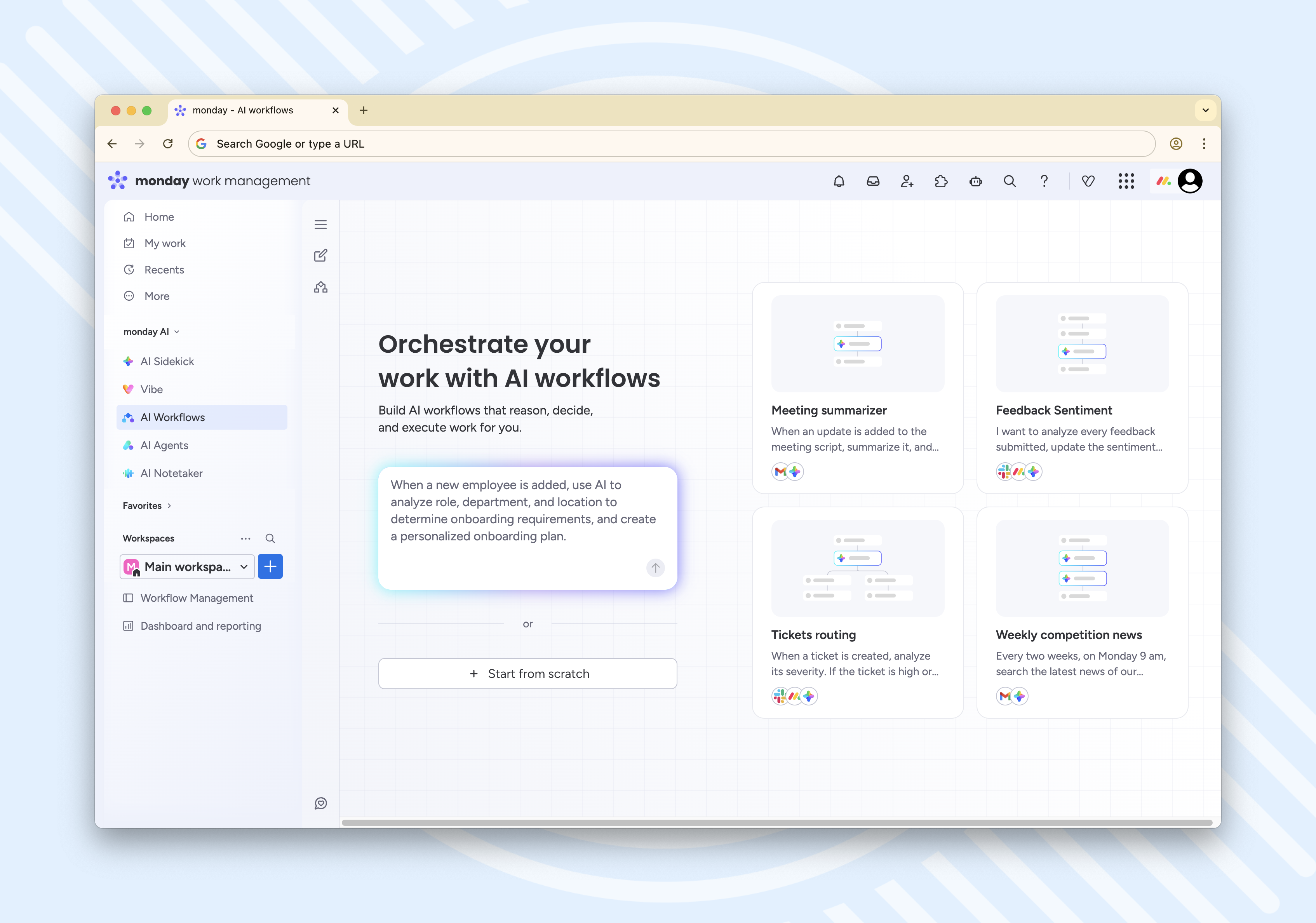
Monday.com is a highly visual work management platform built around configurable boards, views, and templates, with automation and integrations metered by action quotas. It’s a strong fit for cross-functional teams that want quick setup and customisable workflows without heavy admin overhead.
Key features:
- Plan-based pricing with configurable team size and annual vs monthly billing toggles.
- No-code automations and integrations measured in “actions”.
- Automation and integration allotments.
- 200+ integrations marketplace positioning.
Pros:
- Strong integration breadth for mainstream tools
- Clear integration quota visibility at the plan level
- Frequently praised for usability and visual clarity in third-party reviews
Cons:
- Automations and integrations are gated (only available on Standard plan and higher).
- Action quotas can create “automation surprise costs” at scale (upgrade pressure as usage grows).
- Pricing presentation is seat-count dependent, so totals can feel opaque if readers miss the seat selector.
Ideal use cases:
Best for marketing, operations, and client-facing teams that want customisable, visual workflow software with approachable automation, especially where “good enough” governance is acceptable and speed of adoption matters.
3. Jira
Jira is a structured work-tracking platform designed for teams that need configurable workflows, strong governance, and automation rules at scale, often in software delivery environments but not limited to them.
Automation is positioned as no-code, with monthly usage limits varying by plan. Jira also benefits from a large ecosystem of apps and integrations via the Atlassian Marketplace, which expands workflow capabilities substantially.
Key features:
- Kanban and Scrum boards.
- No-code automation rules with plan-based usage limits.
- Admin experience for creating and editing automation rules.
- Plan-based automation allowances.
- Rovo, Atlassian's AI agent.
Pros:
- Deep workflow control via configurable workflows and automation constructs (triggers, conditions, actions).
- Strong scalability (plan tiers, governance, and enterprise options).
- Very large third-party extension ecosystem relative to most workflow tools.
Cons:
- Automation quotas can constrain high-volume teams unless sized correctly; limits reset monthly.
- Ease-of-use is lower than some “lighter” work management tools in aggregated ratings.
- Pricing varies by user tier and can be difficult to state as a single flat per-user number; examples differ by user count.
Ideal use cases:
Best where workflows are highly structured (e.g., multi-step delivery, governance, cross-project automation) and where integration into an existing delivery ecosystem matters.
4. Asana
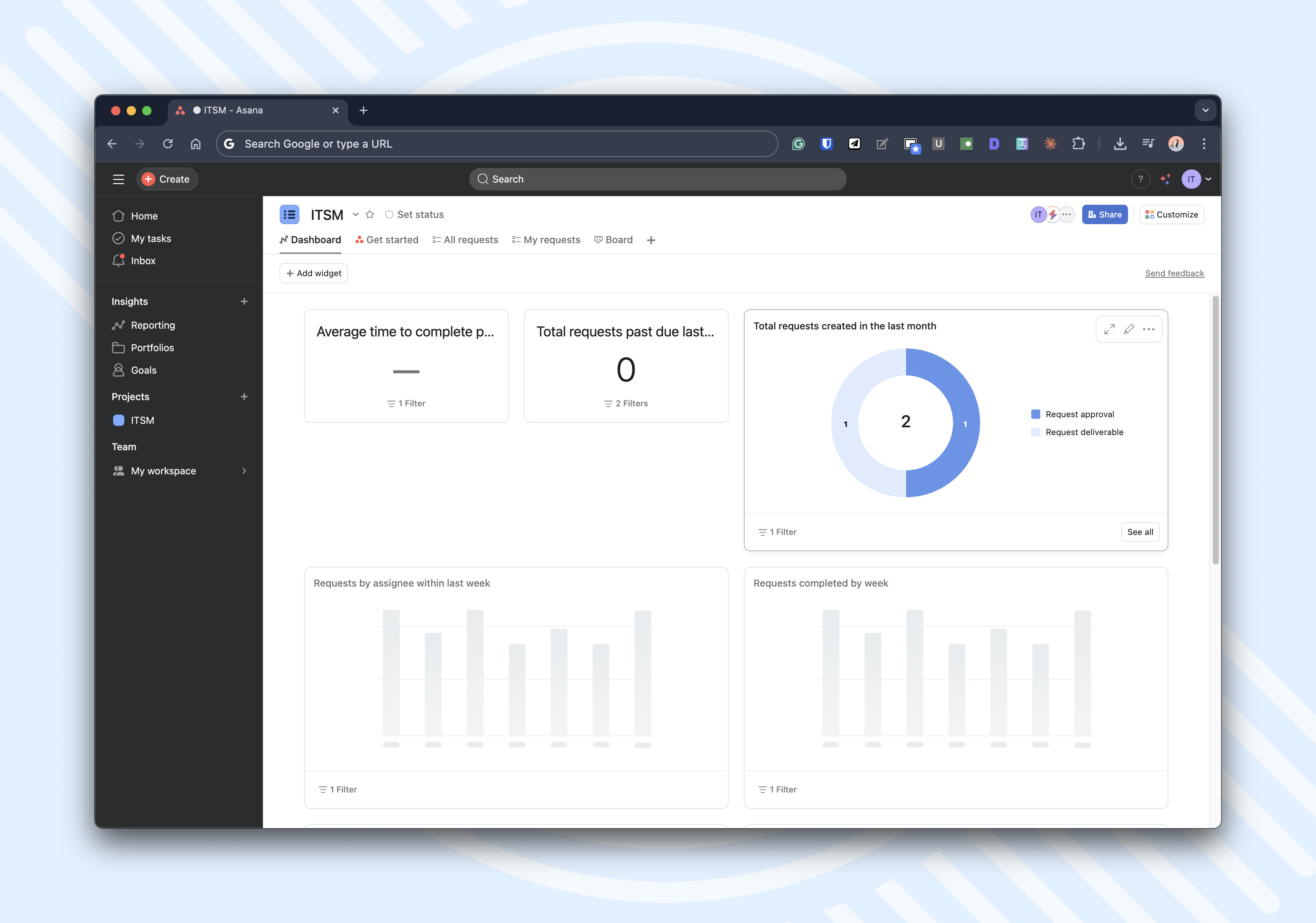
Asana is a work management platform oriented around tasks, projects, and cross-team visibility, with a clear progression from Personal (free) to Starter and Advanced tiers. It explicitly features a no-code workflow builder and “unlimited automations” at the Starter tier, plus timeline/Gantt views and dashboards for delivery tracking. Asana supports distributed teams managing operational workflows.
Key features:
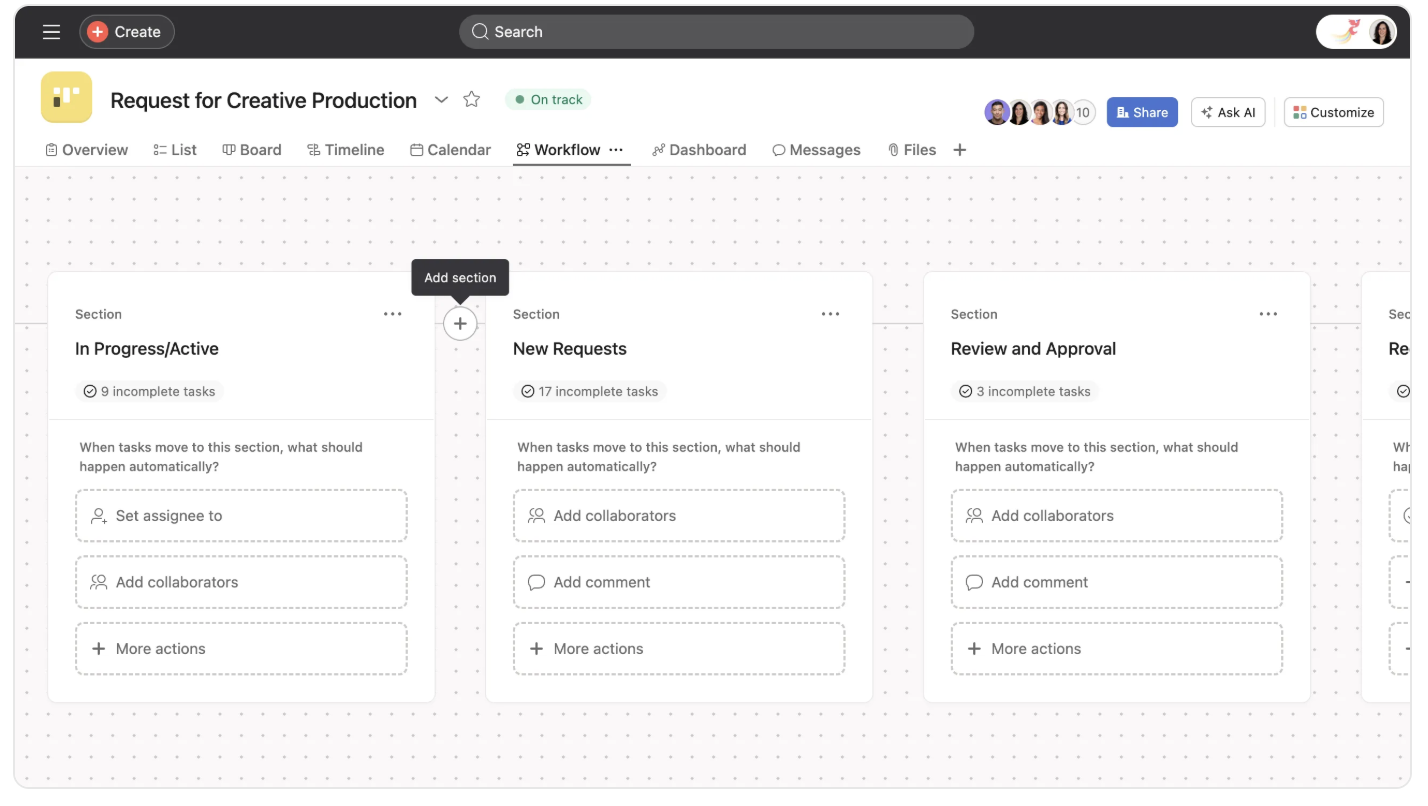
- Timeline or Gantt view, workflow builder, and unlimited automations.
- Real-time tracking via dashboards highlights bottlenecks.
- Advanced plan: portfolios, workload, goals, and integrations with tools like Salesforce/Tableau/Power BI.
Pros:
- Robust automation, rules.
- Cross-team visibility for portfolios/goals at higher tiers.
- Strong ease-of-use perception.
Cons:
- Steep learning curve for advanced features like custom workflows.
- Higher-tier features (portfolios/goals and certain enterprise integrations) increase cost quickly.
- The integration claims are confusing.
Ideal use cases:
Best for teams that want workflow software for cross-functional execution and that benefit from structured visibility (dashboards, portfolios, goals) without adopting a heavier governance model.
5. Wrike
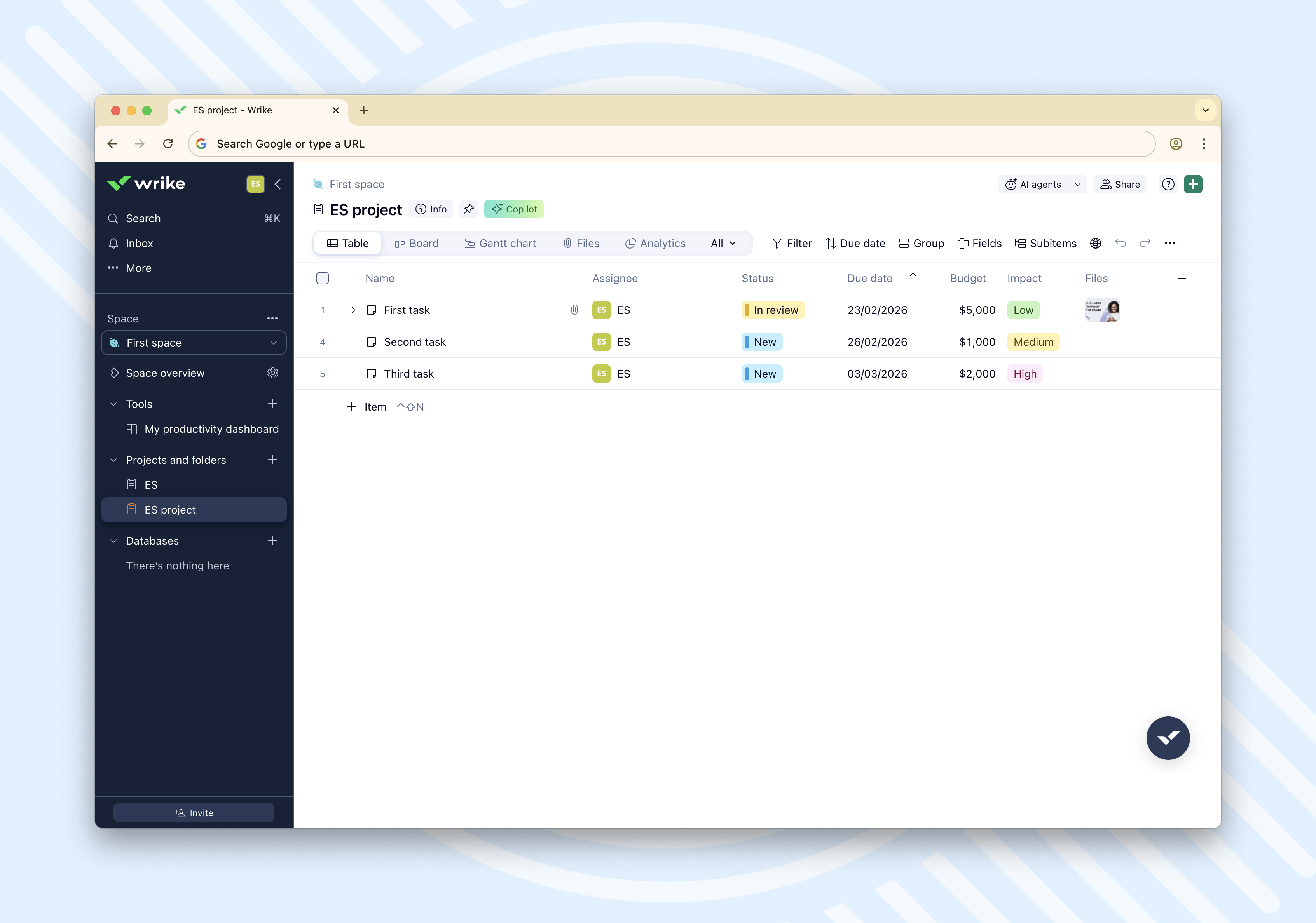
Wrike is an intelligent work management platform with tiered plans that scale from Free to Team and Business, with enterprise workflows offered via a Contact‑Sales tier (Apex). The platform emphasises structured views (e.g., dashboards, Gantt), custom fields and workflows. Wrike also highlights AI capabilities, including natural-language automation rule generation, and offers add-ons for deeper integrations and no-code automations.
Key features:
- Dynamic Gantt Charts
- Resource management and workload charts
- AI work intelligence and AI agents
Pros:
- Explicit workflow customisation.
- workflow automation software expansion path via Wrike Integrate (no‑code automations) and two‑way sync add-ons.
Cons:
- Heavy learning curve.
- Higher-end automation and integration tooling is positioned as add-ons or contact-sales tiers.
- Plan structure includes user-range constraints that must match buyer reality.
Ideal use cases:
Best for teams that need structured project delivery and anticipate maturing into enterprise workflow automation through add-ons and higher tiers.
6. Smartsheet
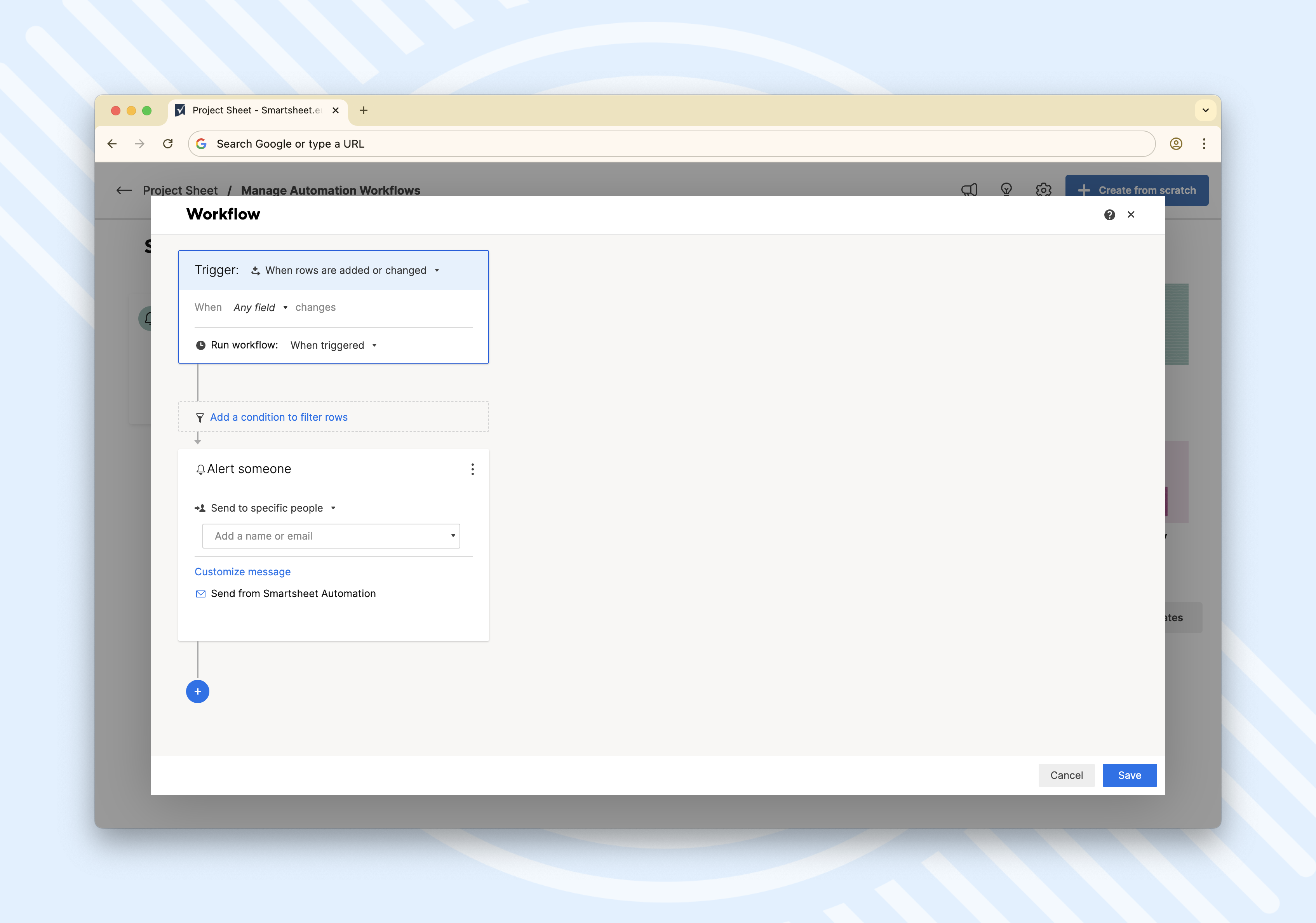
Smartsheet is an “intelligent work management” platform that feels familiar to spreadsheet users but extends into workflow automation, dashboards, and portfolio tooling via higher tiers.
Key features:
- Spreadsheet-like core with multiple views (Gantt, table, board, calendar).
- Cross-sheet reporting.
- No-code automation workflows.
Pros:
- Low-friction adoption for spreadsheet-oriented teams.
- Automation capability is clearly communicated by plan (quotas vs unlimited).
- Strong path to portfolio and controlled execution via higher tiers and add-ons.
Cons:
- Cost scaling is a recurring theme in review excerpts, especially for bigger teams.
- Initial complexity and a steep learning curve, particularly with more complex sheets.
7. Clickup
ClickUp is an platform designed to unify tasks, collaboration, and workflows in a single tool. It offers customizable features like task management, docs, whiteboards, chat, goals, and AI-powered automation for teams across industries.
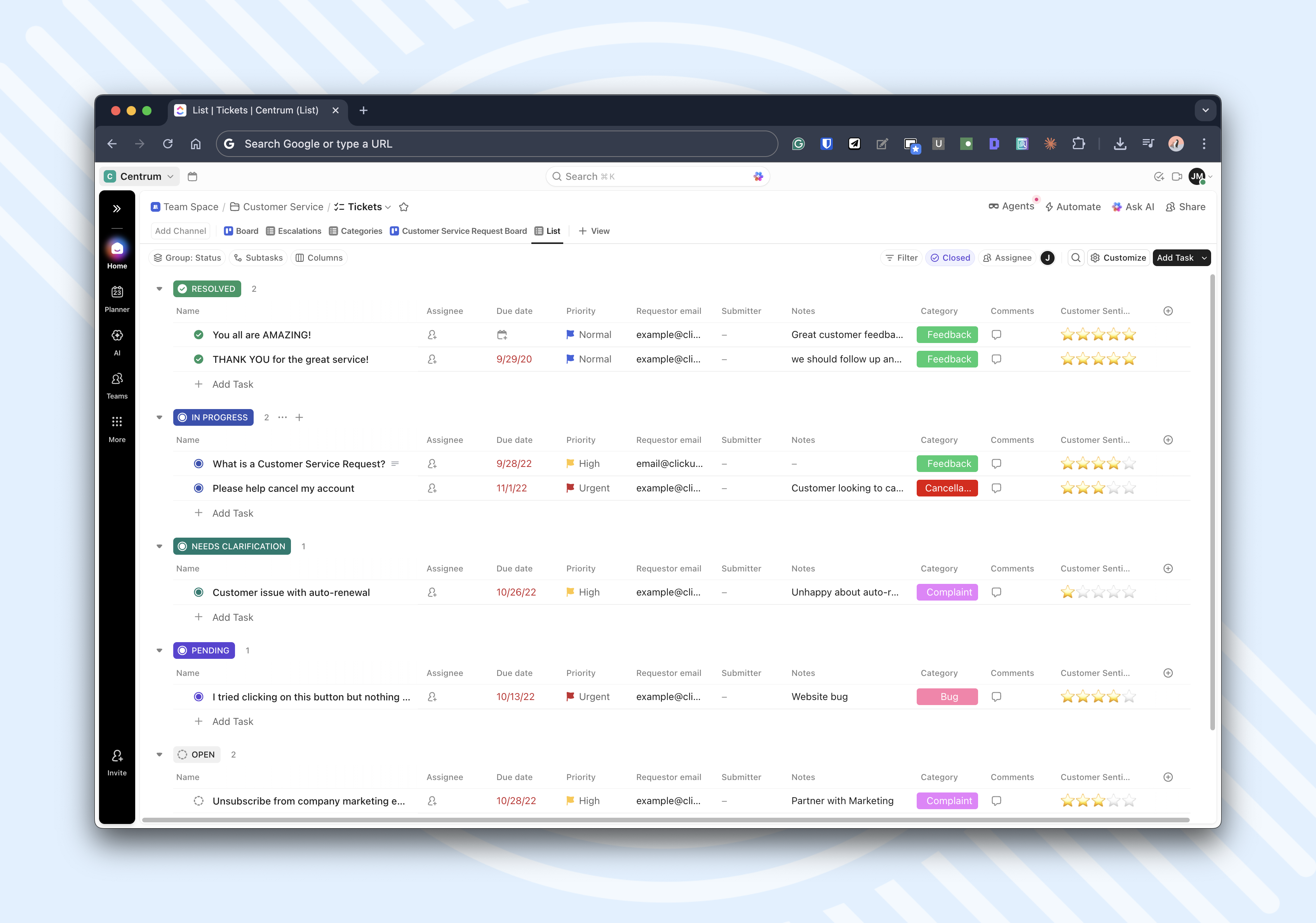
Key features:
- Gantt charts, and calendars.
- Real-time document editing and integrated communication tools.
- ClickUp Brain, the AI for summarization and task generation.
- ClickUp Chat for messaging.
Pros:
- A very strong claim of integration breadth (1,000+ tools).
- Automation scales transparently by plan through a clear actions-based model and published limits.
Cons:
- Automation action quotas can be contentious among users; quotas vary by plan and can require upgrades or add-on purchases.
- The breadth of features can create configuration overhead if teams lack governance.
- Some features are framed as add-ons.
8. Trello
Trello is a Kanban-first workflow tool designed for quick adoption: create a board, add lists or cards, and visualise work immediately. It includes built-in no-code automation and scales features mainly through plan-based “workspace command runs” and advanced views.
Key features:
- Customizable boards that represent projects, divided into lists.
- Integrations of more than 200+ apps and tools via Power‑Ups.
Pros:
- Very fast onboarding and high usability.
- Built-in automation lowers friction for basic workflow automation use cases.
- Paid tiers are straightforward and include explicit prices and key unlocks.
Cons:
- Missing advanced PM tooling.
- Automation “command runs” can become a ceiling for automation-heavy environments unless on Premium.
How to avoid failure when adopting workflow software
When selecting your platform, keep these three principles in mind to ensure your team doesn't reject the tool:
- Avoid forced tool switching: Developers and specialists should be able to trigger automations without leaving their primary environments (like GitLab or Slack).
- Validate on-premises early: If you work in a secure environment, don't rely on cloud-only trials; ensure the tool's automations actually function behind your firewall.
- Watch the "automation tax": Be aware of action quotas (common in Monday, ClickUp, and Jira) where costs can spike as your team becomes more efficient and automates more tasks.
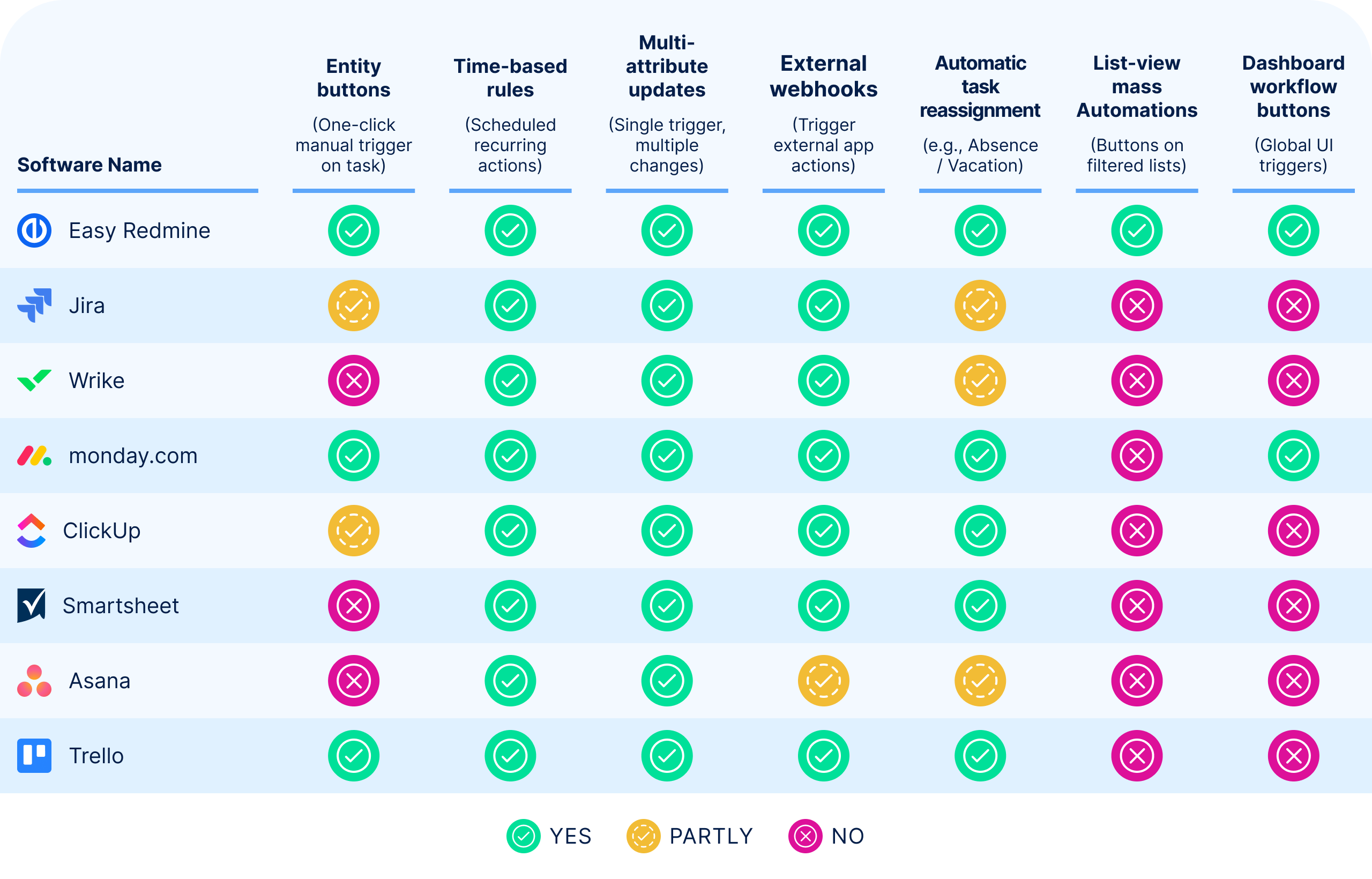
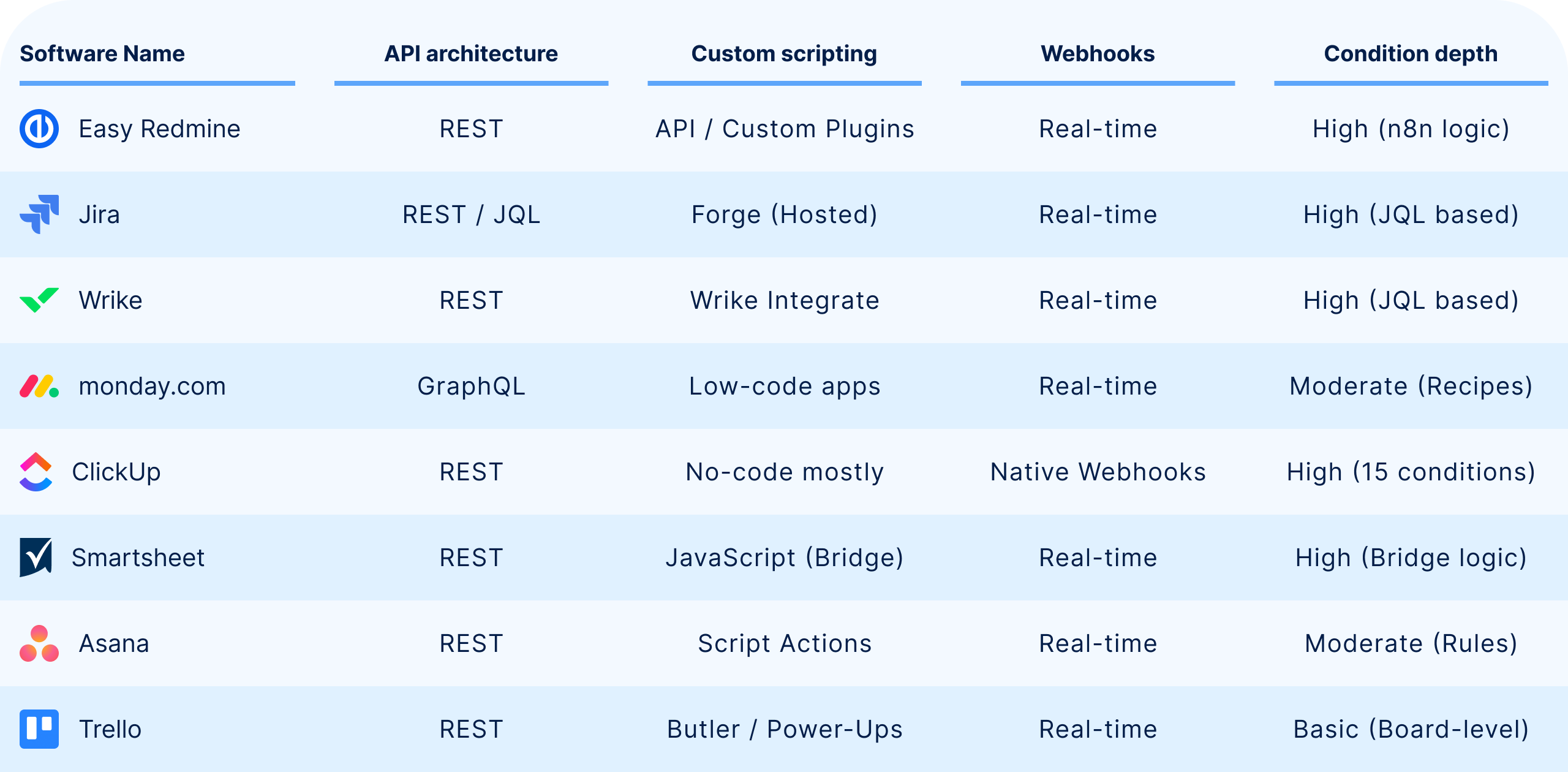
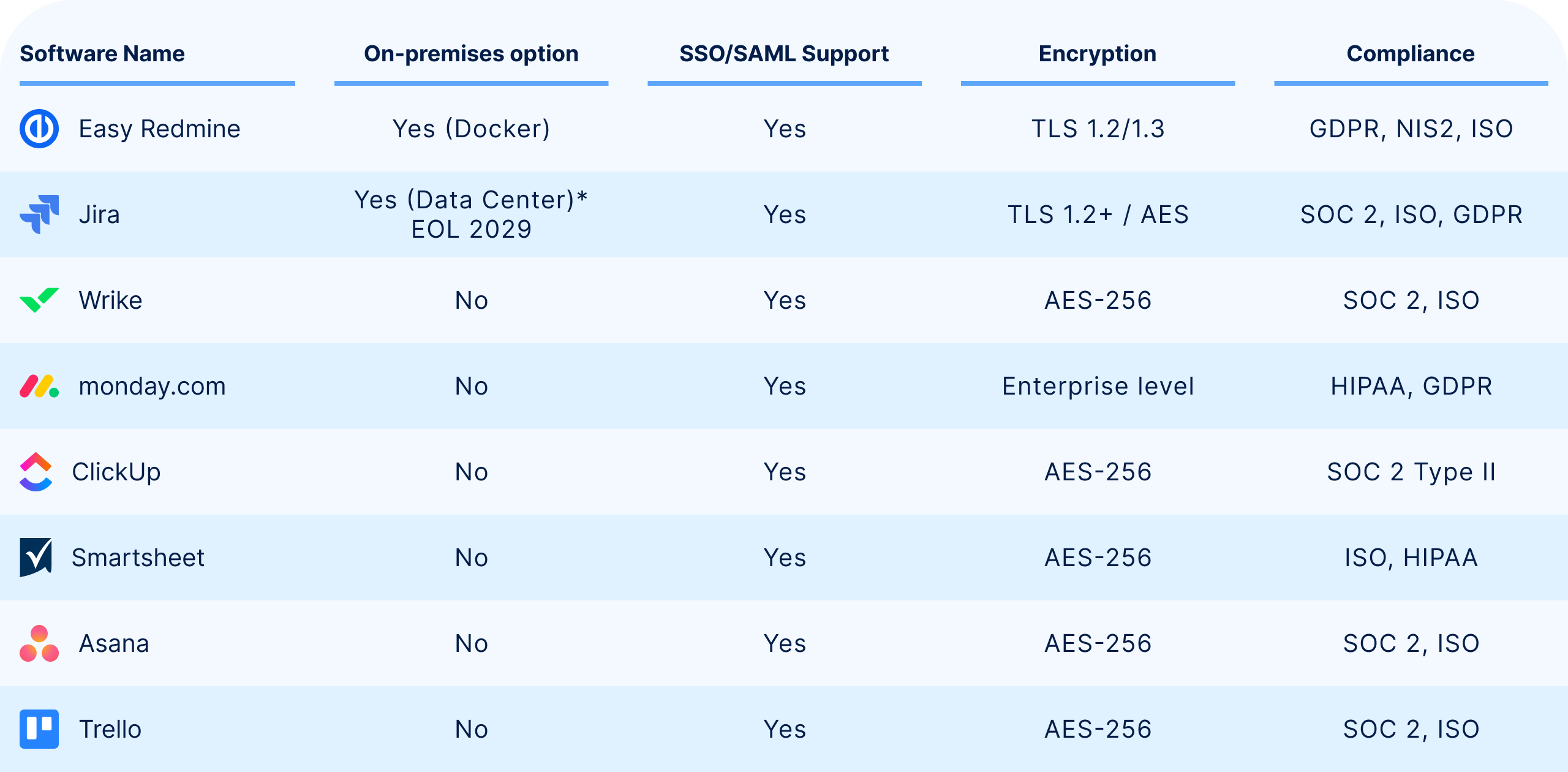
To help you evaluate which platform best aligns with your team's needs, the following tables provides a detailed feature comparison of leading workflow software.
Automation comparison table
Integrations and extensibility of software
Security and governance matrix
Optimizing your workflow automation software ROI
These days, successful workflow orchestration requires a platform that goes beyond simple task tracking to offer deep automation, robust security, and seamless integration without disrupting existing user habits.
For organizations in highly regulated industries or those with strict data sovereignty requirements, Easy Redmine is the premier workflow software choice. Its ability to offer on-premises AI and hybrid Waterfall-Agile support provides a unique balance of innovation and security that purely cloud-based tools cannot match.
While the Jira ecosystem leads in workflow automation software for DevOps via deep JQL capabilities, successful implementation across any platform requires balancing routine automation with the flexibility to handle business exceptions.
Ultimately, the best software is one that respects how people already work by offering clear integration rules and avoiding "automation surprise costs" found in metered action quotas.
Ready to experience the power of the No. 1 Private WorkOps Platform? Try Easy Redmine yourself, start your 30-day free trial (no credit card required) and explore all features, and native n8n integration.
Ready to switch from Jira? Secure your historical data and simplify your transition with our Jira Data Migration service, featuring full entity mapping and expert support to ensure your "standardized escalation" and "absence handling" workflows move over perfectly.
Frequently asked questions
Related articles

From DevOps to WorkOps: The evolution of the modern model of work
WorkOps is to technology project delivery what DevOps was to software development—bringing project, work, and service management into one integrated flow. Do you want to break this idea down? Continue reading...

Introducing the Easy8 and n8n expert partnership
Easy8 is excited to announce a strategic partnership with workflow-automation innovator n8n. By combining Easy8’s deep consulting and implementation experience with n8n’s powerful, fair-code platform, we are making advanced automation accessible, and immediately beneficial for our clients.

Webinar recording: Use AI agent for security and quality workflows
Many quality teams avoid AI because of data security concerns—but the risk of manual errors is just as serious. In this webinar recap, see how Easy8 ’s AI agent helps teams stay compliant while automating repetitive tasks in quality and security workflows.

