


Release notes for version: 15.6.0
Unified logging time form
Logging time spent across the application is now through a unified predictable form. Previously there were more than 5 differently looking and behaving forms for this basic operation.
This is mostly UI/UX improvement, but there are also some new features:
- Save the time entry by hitting ENTER
- See your current day time spent
- Button to save and add another
- Project selection show last 10 selected projects on top
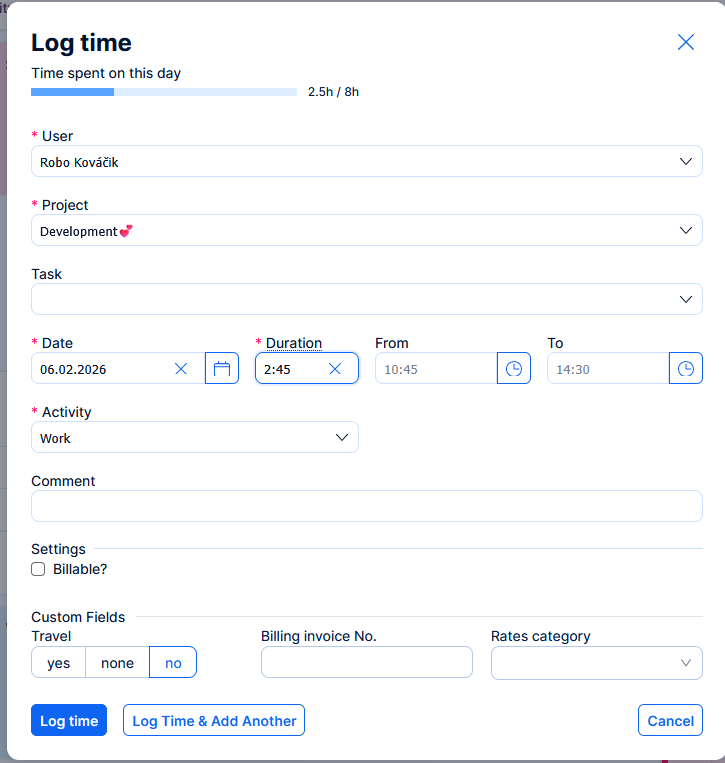
We realize this is a change affecting day-to-day use, and we are prepared to hear out any feedback for further adjustments.
Easy AI features on Cloud applications
Since version 15, Easy AI features are part of the Business and Platform plans. They have been deactivated by default until version 15.5.x, and only activated on demand.
With the update to version 15.6.0, every Cloud application will automatically receive the AI features according to their purchased plan. This process is gradual and is planned to be finished no later than end of February.
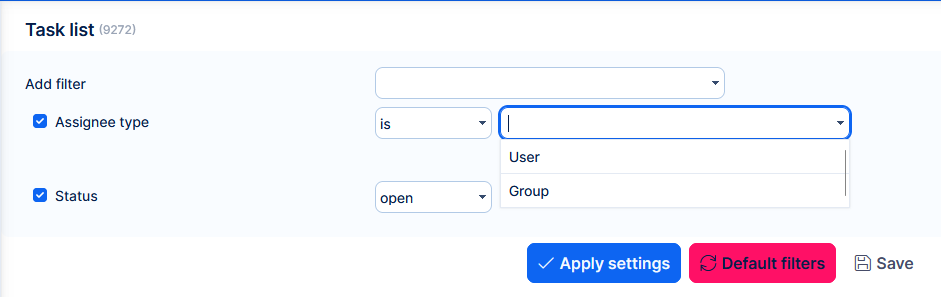
Filtering tasks by assignee type
It is now possible to filter tasks by assignee type (user or group), making it easier to focus boards and lists on relevant work. This helps distinguish tasks assigned to individuals versus groups for clearer, more targeted views. In practice, it can help in Resource management orKanban view to, for example, show/hide tasks assigned to groups.
Activity feed respects planned projects
Tasks in planned projects no longer generate activity feed alerts, preventing premature notifications about unconfirmed work. Planned projects are also excluded from the activity feed project selector.
Error log downloadable again
Server error pages now offer a more secure Download report button so you can quickly share diagnostics with support or troubleshoot issues.
Legacy setting removed
Setting in Administration >>Settings >> Task tracking - Tasks export limit has been removed.
It did not have any functional effect since all list exports became processed asynchronously.
Technological stack
This section is important for Server solution. Cloud users need not worry about any of this.
- OS: Debian 12 on amd64 architecture
- Redmine: upgradable from version 6.0.8
- Ruby: 4.0.1
- Bundler: 2.7.1+
- Rubygems: 3.7.x
- Database: Percona/MySQL 8.0
- redis-server: 8
- NodeJS: 24.13
- Docker engine: 28.3.0
- Docker compose: 2.37.3
⚠️ Ruby and NodeJS are strictly mandatory, without these versions you will not be able to run Easy Redmine.
✅ Or, forget about the management of technological stack and use Docker deployment. It combines the security of on-premises solution with nearly the comfort of cloud solution.
Before every application upgrade, please carefully refer to all release notes between your existing version and the new version - there may be critical technical or functional changes explained.
To avoid sifting through too many release notes in the future, we recommend updating your application regularly. With Docker updating is very simple, and brings you advantages:
- Latest security fixes
- Latest bug fixes
- Fewer changes at a time - better digestible for your users

